

Workday Next Steps:
- Please apply to the Term Lec job posting in Workday within two business days from the time your offer letter is sent to you. Please note, if you do not have an existing profile in Workday, you will need to create one in order to apply.
- Within two business days of us receiving your application, you will receive a notice from Workday. Please log into your profile and digitally accept/sign your official offer letter.
- Once you have accepted the offer in Workday, you will be immediately prompted to enter your social security number and date of birth. This information is necessary for the hiring background process. If you do not immediately see this prompt, please check “My Tasks” in your Workday profile.
Pre-Boarding Process Next Steps:
After you have accepted the offer in Workday, there will be additional steps you will need to take to successfully be on-boarded at the IHP. The Pre-Boarding team will assign you a Talent Acquisition Operations Coordinator to partner with you during his process. Please look for an email from the TA Operations Coordinator containing your next steps for hire.
Part of the pre-boarding process includes filling out a CORI form, which does not need to be notarized. Please have it completed, and ready for submission, prior to the TA Operations Coordinator reaching out to you.
All pre-boarding requirements must be completed within ten days. Your start date may be impacted if there is a delay in submission.
Welcome Email:
Once you have been hired, you will receive a welcome email and new hire packet. Please review all of the information.
For information on accessing and navigating HealthStream, click here.
If you have multiple affiliates, click on MGH/1200.
You will have 30 days to complete the required IHP trainings in HealthStream (please note: any other HealthStream modules assigned will definte the date by which they need to be completed).
To access your training:
• Log on to HealthStream
• Enter your network logon or MGB/Workday ID and a password.
• If the page says “Select Affiliation,” under Student/Manager, click on “1200 – The General Hospital Corporation.” (If you are Out-of- State under Mass General Brigham, select “0100 – Mass General Brigham Incorporated”.)
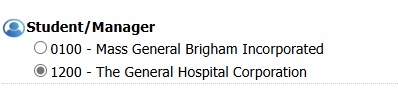
- Under the "To-Do" tab, you will find online learning assignments to complete. Each module is about 20-30 minutes long.
Institute Policies
See a full list of MGH IHP policies on Vitals.
Organizational Information
Technology Resources
Teaching Resources
Non-Discrimination Policy
The MGH Institute of Health Professions does not discriminate on the basis of color, race, creed, gender, sexual orientation, gender identity or expression, age, disability, veteran status, marital status, status as a parent, or national origin. The Institute respects and values the diverse backgrounds of all people and welcomes them to fully participate in campus life.
This policy incorporates, by reference, the requirements of Title VI of the Civil Rights Act, Title IX of the 1972 Educational Amendments, and all relevant federal, state, and local laws, statutes, and regulations.
The Title IX Coordinator for Faculty and Staff is the Director of Human Resources. The Compliance Officer for Students is the Assistant Dean of Student Affairs. They have been appointed to coordinate the Institute’s efforts to comply with the law. See Title IX Compliance Overview.
The MGH Institute of Health Professions is an equal opportunity employer, committed to workforce diversity. EOE/AA.
Once you have completed the new hire forms, you are ready to begin planning for your course. The information in this section pertains primarily to term lecturers who will be present on campus in Charlestown.
Employees who will be on campus need to obtain a photo identification badge that must be worn at all times when on MGH and Institute premises.
ID badges are the property of MGH Police and Security. It is against regulations to share or give away an ID badge for any reason. MGH IHP ID badges are for use by an employee or student only. Non-compliance will result in a direct consequence/penalty.
Badges are issued at the following locations:
- MGH main campus in the Wang Building, Police and Security Desk. Monday-Thursday 7:30am-4:00pm and Fridays 1:00-3:00pm.
- Charlestown Navy Yard, Building 149, West Lobby Security Desk. Wednesday-Friday 1:00-3:00pm.
- Assembly Row, East Building, first floor. Monday-Friday 7:30am-2:30pm or by appointment: 857-282-6000.
The identification badge also serves as your building access key and as a disaster pass in case of public emergency.
Loss of ID Badge: Contact MGH Police & Security and they will deactivate it after 24 hours. There is a cost for replacement ID badges.
Directions
Parking
You can reach our campus in the Charlestown Navy Yard by car, subway, commuter rail, bus, shuttle, ferry, bicycle, or foot.
Although we encourage using public transportation, if you arrive by car, you have several options for parking. Evening and weekend parking will be much easier to find.
Hours of Operation and Building Access
Security guards are located in the lobby of Building 36 and on the second floor of 2 Constitution Wharf.
For 24/7 recorded information, call the "School Closing Information Line" at (617) 724-8484.
Connect-Ed announcements will also be made to faculty, staff, and students. This is the official Institute communication method for school closings. Connect-Ed sends out announcements by email and phone for students, faculty and staff. To add or update email/phone information, go to IOnline to the Address Change screen.
In the event of inclement weather (or other events) that necessitates MGH Institute to close or cancel classes, announcements will also be broadcast on the following Boston stations:
These stations will both broadcast and post-school closings on their respective websites.
WHDH-TV, Channel 7 will only post closings on their website.
Register online to receive automatic cell phone text or email alerts with WCVB-TV, Channel 5, or WHDH-TV, Channel 7 .
All calls for Medical Assistance (617-726-5400) are received through the Navy Yard MGH Police and Security Dispatch.
The dispatcher will collect all pertinent information regarding the medical issue: Type of assistance needed (victim's condition), location, victim’s name, caller’s name, etc.
What happens next?
- Dispatcher notifies all units via radio and 911 as necessary. Officers will respond with the department’s First Responder Kit, which includes an Automated External Defibrillator (AED) and oxygen. Officers will assess the victim, continually communicating information to dispatcher. Additionally the responding patrol officer will stand by outside the respective building to wait for Emergency Medical Services (EMS) and to escort them to the scene.
- An MGH officer will remain with the victim to administer First Aid as needed.
- MGH officer is in charge of the victim until relieved by EMS or another resource with superior skill set, and will remain in charge of scene safety.
- All MGH officers are First Responders and/or Emergency Medical technician (EMT) Level.
- If you are certified in CPR, First Responder or higher medical license, let the on scene officer know and offer your help.
- You can be helpful by allowing the first responders to work unobtrusively and helping keep on-lookers at a distance from the scene.
Emergency Preparedness
Together with MGH Police and Security, the IHP has developed plans to respond to a range of emergencies.
Please use and respect room reservations and class schedules.
After each class, please erase any markings on the board and return computers and seats to their original set up.
Academic Calendar
The Registrar maintains calendars for several years in the future listing deadlines for course withdrawal, final exam schedules, and observed holidays.
Be mindful of scheduling in-class assignments during holidays and make accommodations for students who cannot attend.
The Registrar is responsible for room scheduling for classes. The Registrar handles all credit-related room requests.
The Office of Facilities is responsible for scheduling non-credit-related meetings and/or events, study groups, etc. Please submit a request by using the EMS system.
Contact information for faculty and staff is located in the Directory.